
Somehow I Manage
Work with people, not tasks.
Every task, note and 1:1 lives with the person it’s about. The map below is the real thing — go ahead and poke it.
- Offline-firstWorks on a plane. Syncs when you’re back.
- Private by designOnly your email. Your data stays yours.
- No setupAdd a person, type a line. That’s onboarding.
Three habits, one place.
Add your people
Direct reports, peers, clients. Press + or paste a whole list.
Capture as it happens
Type a line on their card, hit ⌘K from anywhere, or drag a card to hand it over.
Walk into the 1:1 prepared
The agenda builds itself from what’s open. Tick what got done, note what came up.
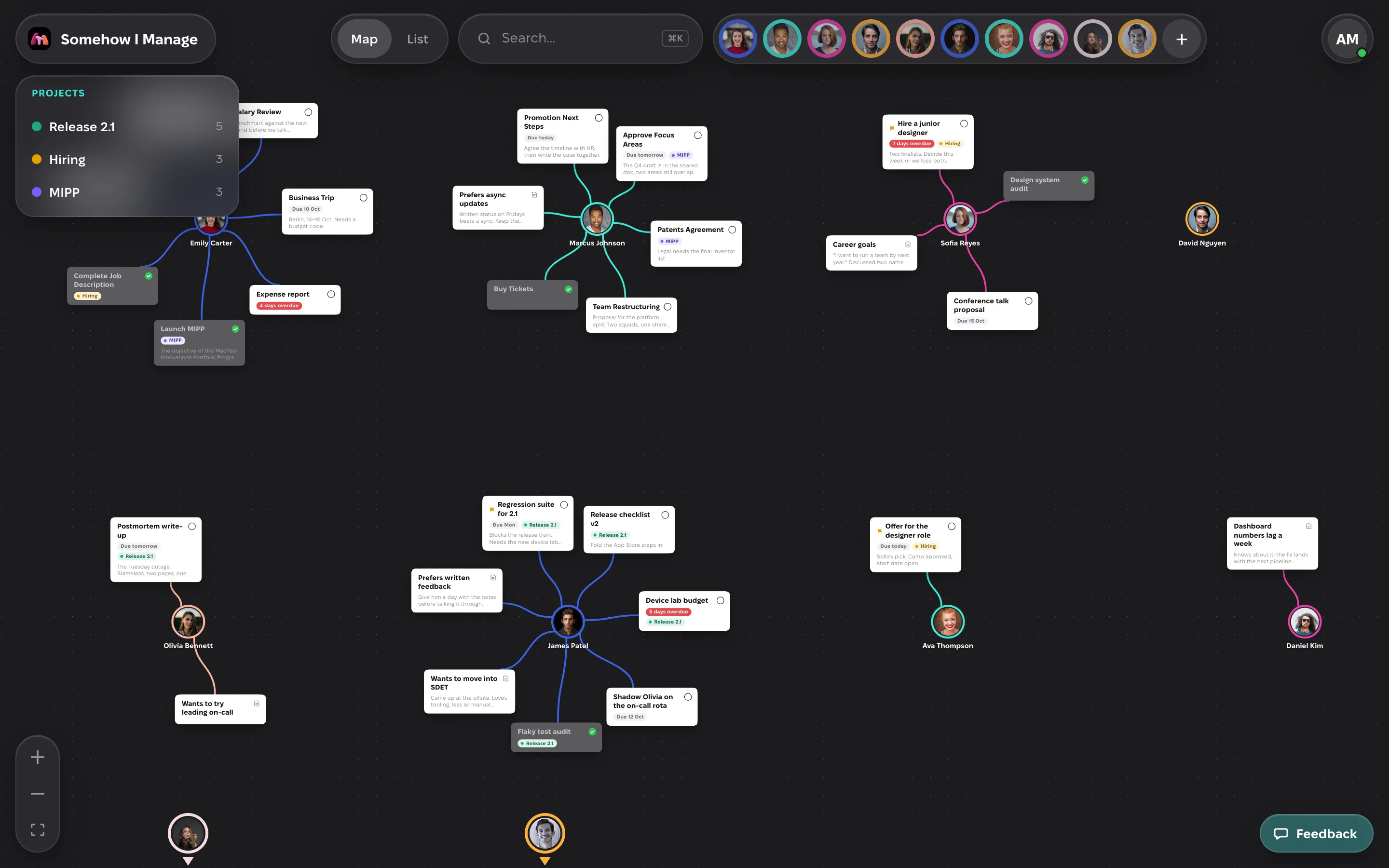
Your whole team, at a glance.
Every task and note hangs off the person it’s about. The map is the plan.
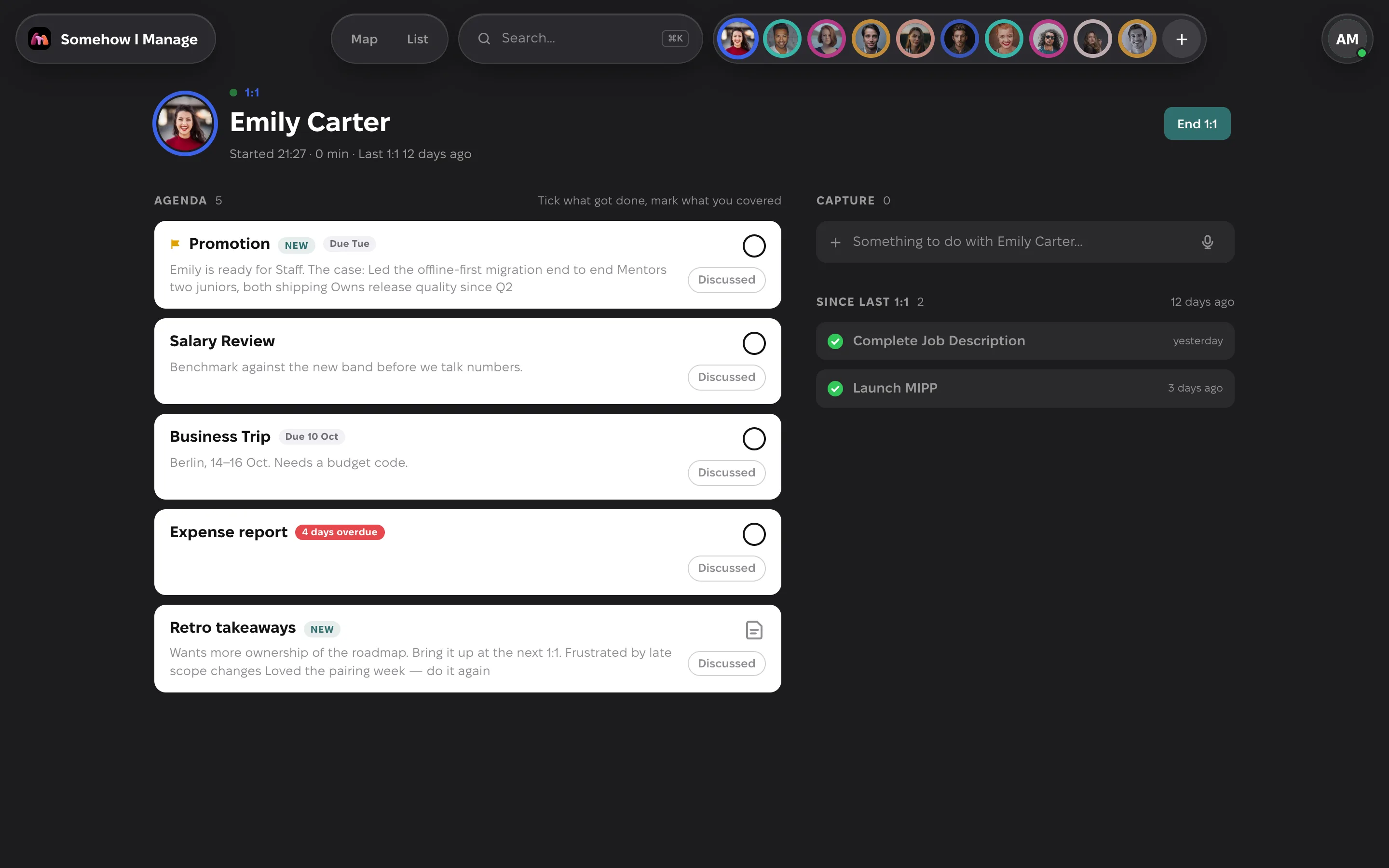
Everything about someone, when you need it.
The agenda is what’s open, what got done since last time sits next to it, and the notes land on the person.
Agentic AI friendly.
Somehow I Manage speaks MCP, the open standard assistants use to work with your tools. Connect it to Claude, ChatGPT, Cursor or any agent, and it works with your people the way you do.
One address
Paste it into the assistant. It asks you to sign in and approve it, once.
Works as you
It sees what you see and nothing more, under the same rules as the app. Disconnect it any time.
Your assistant, not ours
Claude, ChatGPT, Cursor, VS Code, Claude Code: anything that speaks MCP.
- Promotion urgent · due Fri
- Business trip 2 days overdue · MIPP
- Retro takeaways wants more ownership of the roadmap
- Done: Launch MIPP new: Expense report

From the author
I’ve managed teams for a long time. For most of it, everything I knew about my people lived in notes: one note per person, their name as the title, a wall of unstructured text underneath.
It worked, somehow — because the idea behind it was right. You work with people. That’s what matters. The tasks come with them.
Somehow I Manage is that habit, turned into a tool.
Sergii KryvoblotskyiManages a team. Built this to do it better.
Managers don’t have tasks.
They have people.
Tasks belong to people
A to-do without a face is a to-do you’ll ignore. Here every item hangs off someone.
Prepared beats busy
Ten minutes before a 1:1 should be enough. The app does the remembering.
Your data is yours
Offline-first, synced through your own account, exported in one click, deleted in one more.
Questions, answered.
What is Somehow I Manage?
- A task manager built for people managers. Instead of lists and projects, it organises everything around the people you work with: each person has a page with their tasks, notes and 1:1s, and the People Map shows the whole team at a glance.
How is it different from a to-do app?
- Every item belongs to a person, not a list. You see who is waiting on you, you prepare a 1:1 in a minute from what is already there, and handing a task to someone else is one drag on the map.
How do 1:1s work?
- Start a 1:1 from someone’s page and the agenda builds itself from their open items. Tick what got done, mark what you discussed, capture new things as they come up. Ending the meeting records it, and the next one shows what happened since.
Can I group work by project?
- Yes. Tag any task or note with a project; people stay the way in, the project is the thread across them. Cards and rows show the tag, and the Projects panel on the map counts what hangs on each project and, with one click, lights up everything in it, whoever it is with.
Can my AI assistant use it?
- Yes. Somehow I Manage has an MCP server, so Claude, ChatGPT, Cursor and other assistants can read and update your people, tasks and notes as you: “what is open with Vira”, “prepare my 1:1 with Anton”, “add a task with Emily”. You give the client one address, sign in once and approve it; you can disconnect it any time.
Does it work offline?
- Yes. Your data is stored on your device and the app works without a connection. When you are back online it syncs to your account, so your other devices catch up.
Where is my data stored, and who can see it?
- On your device and in a private database tied to your account, hosted by Supabase. Only you can read it. There are no ads, no trackers, no third-party analytics and no selling of data; the only measurement is a first-party count of visits by day. You can export or delete everything at any time.
How do I sign in?
- With Google or Microsoft, using a work, school or personal account. After your first sign-in you can add a passkey and use Face ID, Touch ID or a security key instead.
Does it cost anything?
- No. Somehow I Manage is free to use.
Can I use it on my phone?
- Yes. It is a web app you can install on iPhone, iPad, Mac or Windows straight from the browser. It keeps working offline and opens like a native app.
Start with your team.
It takes a minute.
Only your email address. Export or delete everything, any time.
Something missing? Send feedback — it goes straight to the person who built this.